Claude Opus 4.6 vs Google Gemma 4 on a 5-Year-Old MacBook M1 Pro
Can a five-year-old MacBook challenge Claude Opus 4.6 at code review? Google Gemma 4 takes on a real 1,322-line merge request. Discover the surprising results and two small settings that turned it into a genuinely useful local reviewer.


Have you ever watched an AI review your merge request in under a minute and thought: “this is wonderful, but my code just took a trip to someone else’s server?”
That thought had been sitting in the back of my head for months.
Most of us have laptops that are capable of doing powerful things. Even if our laptops are a few years old.
So when innovation day came around at Showpad, one full day to experiment with anything that could make our engineering team better, I finally gave myself a proper challenge.
Can a model running on my laptop review our merge requests as well as Claude running in the cloud?
In this article, we’ll walk through exactly how to set up a local AI code reviewer, which model size is actually worth running, the two settings that make or break performance and honest head-to-head numbers against a cloud model.
So let’s get started! 🙌
Why bother at all?
We already have great tooling. Claude and CodeRabbit review a 1300-line TypeScript merge request in about a minute, catch real bugs, flag security issues and follow our custom review format.
So why mess with a good thing?
Three reasons a local model can provide benefits:
- Privacy. Our code never leaves the machine. No tokens sent to an API, no diffs stored somewhere else. For a company handling enterprise customer data, that matters.
- Cost. API calls add up. A local model runs on hardware we already own.
- Curiosity. Google had just released Gemma 4, their latest open model family and I wanted to know whether open models had finally caught up.
The constraint I set myself: zero to working local reviewer in a single day on a five-year-old MacBook Pro M1 Pro with 32 GB of unified memory.
Nothing exotic.
Just a great laptop that is still used by many engineers in 2026.
The setup is super simple
Three commands. That’s it.
 # 1. Install Ollama and start the local inference server
brew install ollama
ollama serve   # now serving at http://localhost:11434

# 2. Pull the model (18 GB, ~10 minutes on my connection)
ollama pull gemma4:26b

# 3. Sanity check
ollama run gemma4:26b "What is the capital of Belgium?"
If it answers Brussels, we’re in business.
Ollama handles model downloads, quantization, memory management and exposes an HTTP API out of the box.
Total setup time: under 15 minutes.
Turning it into an actual reviewer
A chatbot is fun, but I wanted something that fits my daily workflow.
Today we have a custom command that asks Claude to review a GitLab MR:
/sp-review-mr https://gitlab.com/<my-org>/<repo>/-/merge_requests/<id>It presents the findings, then asks whether we want the agent to post comments on the MR or fix the issues directly.
It works really well and saves us a lot of time and resources at Showpad.
The goal for the day was to replicate that behaviour locally.
I used Claude Opus 4.6 to write the code (yes, cloud AI helping me build its local competitor 😂) and ended up with a review.sh script.
The heart of it is a single API call:
curl -s "$OLLAMA_HOST/api/chat" \
  -H "Content-Type: application/json" \
  -d "$(jq -n \
    --arg model "$MODEL" \
    --arg system "$SYSTEM_PROMPT" \
    --arg user "$user_message" \
    '{
      model: $model,
      messages: [
        {role: "system", content: $system},
        {role: "user", content: $user}
      ],
      think: false,
      stream: false,
      options: {
        temperature: 0.1,
        num_ctx: 32768
      }
    }')" \
  | jq -r '.message.content'
Three settings in there turned out to be the whole story of the day:
think: falseskips extended reasoning and gave a 3x speed boost, more on that below.temperature: 0.1keeps output focused and near-deterministic. Code review is not creative writing.num_ctx: 32768sizes the context window to fit a full MR diff.
The system prompt tells the model to act as an expert code reviewer and to report findings in four severity levels: Critical, Warning, Suggestion and Positive Observations, matching the format our team already uses with Claude.
The script takes several input modes:
./review.sh diff                  # staged changes
./review.sh diff main             # changes against a branch
./review.sh file src/utils/auth.ts
./review.sh mr https://gitlab.com/your-org/your-repo/-/merge_requests/123
./review.sh pr 456./review.sh --focus=security mr https://gitlab.com/...The --focus flag zooms in on security, performance, tests or style, injecting domain-specific criteria into the system prompt.
Four models, one merge request
Gemma 4 ships in five sizes: E2B, E4B, 12B Unified, 26B A4B and 31B Dense.
I benchmarked four of them against the same real 1322-line MR from our frontend codebase.
Model         Architecture         Download   Review time   Quality
gemma4:e2b    MoE, 2.3B active     7.2 GB     4:14          Fair
gemma4:e4b    MoE, 4.5B active     9.6 GB     5:13          Good
gemma4:26b    MoE, 3.8B active     18 GB      5:27          Very Good
gemma4:31b    Dense, 30.7B total   20 GB      23:04         Good
Look at that table for a second.
How is the 26B model almost as fast as the tiny 2B one, and four times faster than the 31B?
The answer is Mixture of Experts (MoE).
The 26B model has 25.2 billion parameters in total but activates only about 3.8 billion of them per generated token. Under the hood it holds 128 experts and routes each token to just 8 of them, plus one shared expert that always runs.
Think of it as a department of 128 specialists where only nine ever get pulled into any given question: we get the knowledge of a big team at the speed of a small one.
The 31B model is dense. It has 30.7 billion parameters and every single token activates all of them. On a 32 GB machine that leaves almost nothing for the context window and the whole thing grinds.
But is the review any good?
Speed is meaningless if the output is noise. Here’s what each model actually found in the same code:
- E2B flagged
execFileSyncas a Critical Issue, then admitted in the same paragraph that the inputs are hardcoded and safe. Hypothetical future risks instead of actual bugs. Lots of words, not much signal. - E4B produced the single most sophisticated finding of the bunch: our
escapeHtmlhelper protects against XSS in HTML context but not against JavaScript string literal injection when the data is embedded inside a<script>block. That’s a subtle and very real distinction the others flattened. - 26B gave the most balanced review overall. It pinpointed the
innerHTMLXSS surface with line numbers, caught a missingtry/catcharound aJSON.parsethat could crash a background refresh loop and praised the use ofexecFileSyncoverexecfor avoiding shell injection. Specific, actionable, cleanly formatted. - 31B landed at roughly the same quality as 26B but after 23 minutes. Not worth the wait.
As a reference, here is the output from running the review with 26B against code that deliberately has some issues:
## 🔍 Branch Review: local-ai-review-demo vs develop

### 📊 Summary

- **Files Changed**: 11 files
- **Lines Added**: +1322
- **Lines Removed**: -0
- **Review Focus**: all

### 🔴 Critical Issues (1)

**File: `local-ai-review-demo/glab-enrichment.ts`**

- **Line 16**: Potential for unbounded memory usage/DoS in `getPipelineUrls`.
    - **Problem**: The function iterates through `uniqueShas` and performs a synchronous `execFileSync` call for every single SHA. If the number of apps/SHAs is large, this will block the event loop for a significant amount of time and could lead to high CPU usage or process hangs. Furthermore, `JSON.parse(output)` is called on untrusted output from a shell command.
    - **Fix**: Use `exec` (asynchronous) with a concurrency limit (e.g., using a library like `p-limit`) to process SHAs in batches.

### 🟠 Warnings (2)

**File: `local-ai-review-demo/app-registry.ts`**

- **Line 6**: Use of `require` with type casting.
    - **Suggestion**: Since this is a TypeScript file, use `import` statements instead of `require`. Using `require` with `as` casting bypasses the benefits of static analysis and can lead to runtime errors if the constant structure changes.

**File: `local-ai-review-demo/git-enrichment.ts`**

- **Line 11**: `maxBuffer` is set to 10MB.
    - **Suggestion**: While 10MB is likely sufficient for most logs, `git log` output can grow significantly in large monorepos. Monitor this value. If the buffer is exceeded, `execFileSync` will throw an error, breaking the dashboard.

### 🟡 Suggestions (2)

**File: `local-ai-review-demo/html-renderer.ts`**

- **Line 1115**: Use of `innerHTML` with template literals.
    - **Suggestion**: While the data is mostly sourced from your own git commands, using `innerHTML` with string concatenation is a security risk (XSS) if any part of the commit message or author name contains malicious HTML. Even though you have an `escapeHtml` function in `SHARED_JS`, it is safer to use `document.createElement` and `textContent` for all dynamic data.

**File: `local-ai-review-demo/server.ts`**

- **Line 56**: Use of `setTimeout` for background refreshes.
    - **Suggestion**: For a production-grade tool, consider using a more robust scheduling approach or a library like `node-cron`. The current implementation relies on a recursive `setTimeout` which is fine for a local tool but can drift significantly under load.

### 🟢 Positive Observations

- **Excellent Feature Set**: The dashboard provides a very high-value utility for the team, covering drift, Jira integration, and pipeline links.
- **Clean Separation of Concerns**: The logic is well-split between data fetching (`git-enrichment`), parsing (`git-tags`), and rendering (`html-renderer`, `table-renderer`).
- **Great UX/UI**: The inclusion of both a static HTML export and a live-updating server is a thoughtful touch for different use cases (CI/CD vs. local monitoring).
- **Strong Visual Design**: The use of brand tokens and a clear, semantic color system (green/yellow/red) makes the dashboard highly readable.
- **Robust CLI**: The use of `yargs` provides a professional and easy-to-use interface for developers.

### 📝 Recommendations

1. **Refactor `getPipelineUrls` to be asynchronous**: This is the most important change to prevent the dashboard from freezing during large updates.
2. **Standardize Imports**: Replace `require` with `import` in `app-registry.ts` to maintain TypeScript best practices.
3. **Sanitize HTML Generation**: Audit the `html-renderer.ts` to ensure `textContent` is used instead of `innerHTML` wherever possible to prevent XSS.
The thinking mode trap
My very first review took 15 minutes. Same model, same MR.
By default, Gemma 4 uses extended thinking: it reasons through the problem in an internal scratchpad before answering.
That’s wonderful for maths proofs and logic puzzles but overhead for a structured code review where the system prompt already spells out what to look for and how to format it.
Setting think: false took the review from 15:00 down to 5:27.
A 3x speedup, with no quality loss. 🚀
Single biggest win of the day. 💡
The context window gotcha
I also learned an expensive lesson.
Trying to save memory, I started with num_ctx: 8192. The model ran for 83 minutes and produced… an empty response. 😅
Our 1322-line diff plus the system prompt simply didn’t fit in 8K tokens. 🙈
No input, no output.
num_ctx: 32768 fixed it instantly.
💡 Rule of thumb: the context window has to comfortably hold the system prompt plus the entire diff. For real-world MRs, 32K is a safe default.
Bonus: a ChatGPT-like UI, for free
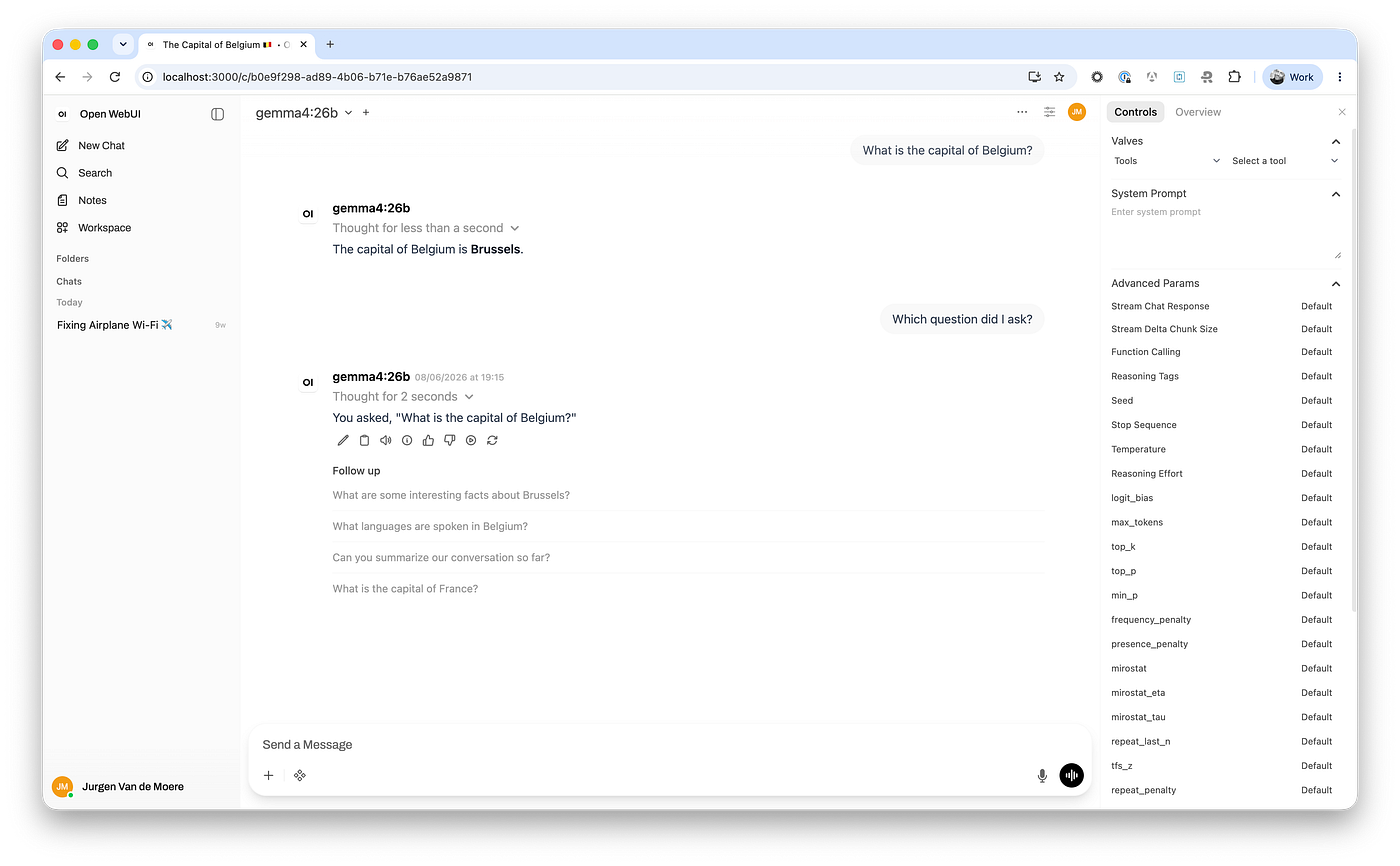
If we want a browser interface on top of the same local models, Open WebUI is beautiful and only one command away:
docker run -d -p 3000:8080 \
  --add-host=host.docker.internal:host-gateway \
  -v open-webui:/app/backend/data \
  --name open-webui \
  ghcr.io/open-webui/open-webui:main
Open http://localhost:3000, create a local account, and there’s a familiar chat window wired to Ollama. Lovely for ad-hoc questions and pair programming.
So how does it compare to Claude?
To replace vibes with numbers, I ran three consecutive reviews of the same 1322-line MR with each and measured wall-clock time.
Run             Gemma 4 26B (local, M1 Pro)   Claude Opus 4.6 (cloud)
Run 1 (cold)    7m 42s                        1m 52s
Run 2           4m 40s                        0m 53s
Run 3           4m 04s                        0m 59s
Average         5m 28s                        1m 15s
Warm average    4m 22s                        0m 56s
Cold runs are slower on both sides for different reasons: Gemma needs to load weights into GPU memory, Claude needs to fetch and read the full diff.
Warm to warm, Claude is about 4.7x faster.
                    Claude Opus (cloud)   Gemma 4 26B (local)
Review time         ~1 min                ~5 min
Quality             Excellent             Very Good
Privacy             Code sent to API      Code stays on the machine
Cost                Per-token pricing     Free after hardware
Internet required   Yes                   No
Works on a plane    No                    Yes
Claude also produces slightly more nuanced reviews. It’s better at architectural intent and at connecting findings across files in our benchmark. It caught a dead variable (cdnSet, declared and never used) and a constant duplicated across two files (REFRESH_INTERVAL_MS) that Gemma missed.
But the local model catches the same categories of bug: XSS surfaces, missing error handling, event loop blocking, security best practices.
For a first-pass review or a quick security scan before pushing, it is genuinely useful and nothing ever leaves the laptop.
What I’d do differently
Skip the dense 31B entirely. MoE models are the clear winners on consumer hardware: large-model intelligence at small-model speed.
Set think: false from minute one instead of discovering it halfway through the day.
Spend more time on the system prompt. It moves output quality more than anything else and there’s plenty of room to teach it our own codebase conventions.
Where local catches up
Token generation is memory-bandwidth bound: for every token, the GPU streams the model’s active weights out of memory.
For our MoE model that’s the ~3.8B active parameters rather than the full 18 GB on disk, which is exactly why the 26B keeps up with the 2B.
Either way, generation speed scales roughly linearly with bandwidth, which makes projections easy:
Hardware                   Bandwidth   Projected warm review   vs M1 Pro
M1 Pro (tested)            ~200 GB/s   4m 22s                  1.0x
M4 Pro                     ~273 GB/s   ~3m 12s                 ~1.4x
M1 Max                     ~400 GB/s   ~2m 11s                 ~2x
M4 Max (40C GPU)           ~546 GB/s   ~1m 36s                 ~2.7x
M5 Max (40C GPU)           ~614 GB/s   ~1m 25s                 ~3.1x
RTX 4090 (~$2,500-3,700)   ~1.0 TB/s   ~53s                    ~5x
RTX 5090 (~$4,300)         ~1.8 TB/s   ~29s                    ~9x
💡 These are projections, not measurements and they’re optimistic. Only decode is bandwidth-bound; reading and processing the prompt is compute-bound and a 1322-line diff is a big prompt. Real speedups will likely land below the multipliers above.
Still, the shape of it is striking.
A current-generation M5 Max laptop lands around ~1m 25s, within shouting distance of Claude Opus’s measured 1m 15s average, with every line of code staying on the machine.
An RTX 5090 desktop overtakes it outright at ~29s. At roughly $4,300 in 2026, that becomes a true local powerhouse.
Summary
Local AI code review is a 15-minute setup: install Ollama, pull gemma4:26b, point a small script at your diff.
Pick a Mixture of Experts model. The 26B MoE (18 GB) reviews in ~5 minutes; the dense 31B takes 23 for the same quality.
Two settings dominate performance: think: false (3x faster, no quality loss) and num_ctx: 32768 (anything smaller silently swallows your diff).
Keep temperature at 0.1 because code review is not creative writing.
Claude’s model running in the cloud is still ~4.5x faster and sharper on architecture.
But Google’s local models are close enough to be genuinely useful today and the hardware curve says the gap closes with the next laptop generation.
A few days later, I ran a full review at 10,000 metres from my seat on the airplane. Same script, same model, same five minutes. ✈️
That was the moment it stopped feeling like an experiment. It wasn’t a demo anymore. It was a new superpower sitting on my laptop.
Local AI isn’t a toy anymore. It’s ready for real work. 💪
Give it a try and build something beautiful. 🙌
Wherever you are! 🚀